I built totpd, a small Go web daemon that reads TOTP key files from disk and exposes the current one-time password through a simple web interface.
You can download it from HERE
The motivation came from a small recurring annoyance.
A friend sometimes needed access to a service protected by OTP, and each time I had to send him a short-lived code manually - that worked only when I was available right away.
If I was away from keyboard, busy, or just missed the message for a minute, the code expired and we had to repeat the same exchange again.

So I decided to make a tiny app that can safely sit behind my own access controls and give him the current OTP by URL whenever he needs it.
Live example here: https://anarjafarov.me/totp/example
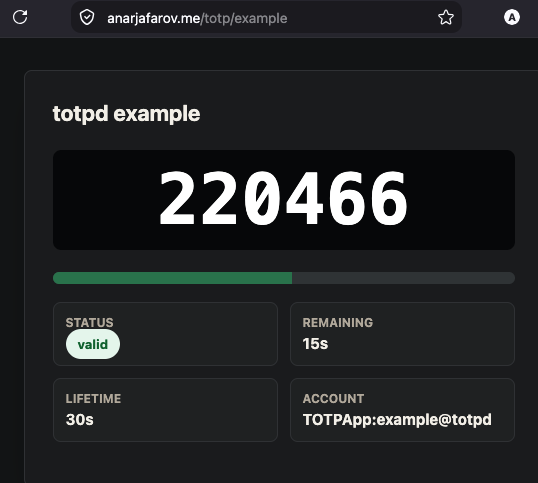
What it does
totpd scans a keys/ directory and creates routes for each token:
GET /totp/<name>shows an HTML page with the current code.GET /totp/<name>/statusreturns JSON status for the current code.
The status endpoint includes the token name, current code, remaining seconds, expiry time, label, issuer, algorithm, and progress value. Responses use Cache-Control: no-store.
Key files
Each token name comes from the filename. Supported key sources are:
keys/<name>.url.txtkeys/<name>.qr.pngkeys/<name>.qr.jpgkeys/<name>.qr.jpeg
The URL text file can contain an otpauth://totp/... URL, an otpauth-migration://... URL, or a raw Base32 secret. Raw secrets use safe defaults: SHA1, 6 digits, and a 30 second period.
On startup, totpd also reconciles URL and QR files. If only a QR file exists, it decodes the QR payload and writes the canonical URL file. If both exist and differ, the newer source wins and older conflicting files are moved aside under keys/deleted/YYYYMMDD/.
Running it
Build and run locally:
make
make run
The default listen address is:
127.0.0.1:3080
You can override it with:
make run TOTPD_ADDR=127.0.0.1:4000
The bundled example token is available at:
http://127.0.0.1:3080/totp/example
Installing as a service
The repository includes Makefile targets for installing the binary and systemd unit:
make install
make service
sudo systemctl restart totpd.service
By default, installation uses /etc/totpd:
WorkingDirectory=/etc/totpd
Environment=TOTPD_ADDR=127.0.0.1:3080
ExecStart=/etc/totpd/totpd
make install and make service write to /etc paths, so they usually need sudo on a normal Linux host.
Reverse proxy
The repo also includes an example Nginx snippet that proxies /totp/ to the local daemon and denies direct access to /keys/:
location /totp/ {
    proxy_pass http://127.0.0.1:3080;
}

location /keys/ {
    return 404;
}
Security note
totpd does not include authentication. Anyone who can reach a token URL can read that token’s current one-time password.
That is deliberate: the daemon stays small and leaves access control to the layer in front of it.
Put it behind TLS, a VPN, an allowlist, HTTP auth, SSO, or another trusted reverse proxy before exposing real tokens.
GitHub link
https://github.com/Codomari/totpd